In this article I'll share some thoughts about using a computing platform which commercially died about 30 years ago, that still survives today in a niche market, thrives thanks to its dedicated fanbase and what we can learn from all this.
The computing platform object of this article is the Commodore Amiga, which for a lot of people will likely trigger nostalgic memories. A fact commonly associated with retrocomputing is that limited hardware is sometimes regarded as a powerful stimulant for creativity.
But today we will not indulge in any of that. Instead, I'll focus on how a computer with such modest specs can provide the calm computing experience we kind of lost today.
The article that sparked these thoughts is titled Amiga Through the Lens of an LD Learner author by Timo Paul, published in December 2023 on the fanzine WhatIFF?, a tiny project from a group of enthusiasts, just like they used to be back in the day. The article is written by a teacher working with children with learning difficulties (LD): the teacher describes how a student with LD interacted with an Amiga and shares a perspective I've found interesting.
Let's start by saying that an Amiga is far from being a didactical device but has some traits that surprisingly make it fit for this role. The main points the author raises are:
-
Interaction through a keyboard with big key travel: tactile and audible feedback provides a better sensorial experience than a modern low-profile keyboard or a touch device.
-
Distraction-free platform. No advertisement, no popups or other nuisances competing for our attention span. These are actual disabling factors that very few application or web designer takes into account.
-
Offline-first computer. Less chances to lose focus and divert the attention from the task at hand. Here's a short article on the topic.
-
Low resolution and simple GUI design: this seems counter-intuitive but those help focusing because you have to be conscious about which windows will fill your screen. Here's an article from the maintainer of the Marginalia search engine where he makes a general point that I think also applies here. Now, a stock classic Amiga has a quite small resolution (needs expansion boards to support bigger resolutions) but applications are designed for that screen size and they don't feel crammed. Excessive screen real estate can lead to distractions.
And don't get me started with GUIs. There was a time when user interfaces were well thought out. Modern trends introduced unclear and confusing paradigms. Why a desktop computer GUI language should mimic a mobile application? I'm thinking to Gnome 3, Gnome 4 or software from Apple, once a company that published thick books about human interface design.
Just to be clear about what we are talking about, the article author describes the student using an Amiga 600 with just 2 MiB of RAM. It's a compact 36x25 cm box that looks like this:
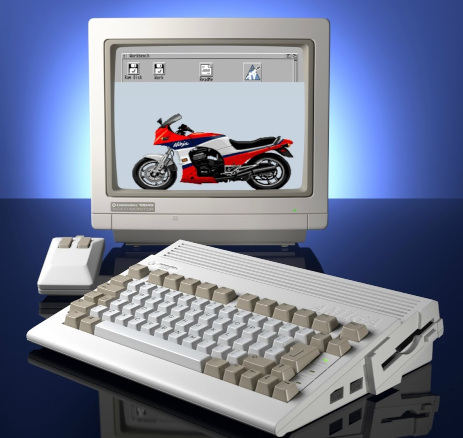
equipped with a CPU clocked at about 7 Mhz and the default desktop configuration has a resolution of 640x256 pixels with a whopping 16 colors:
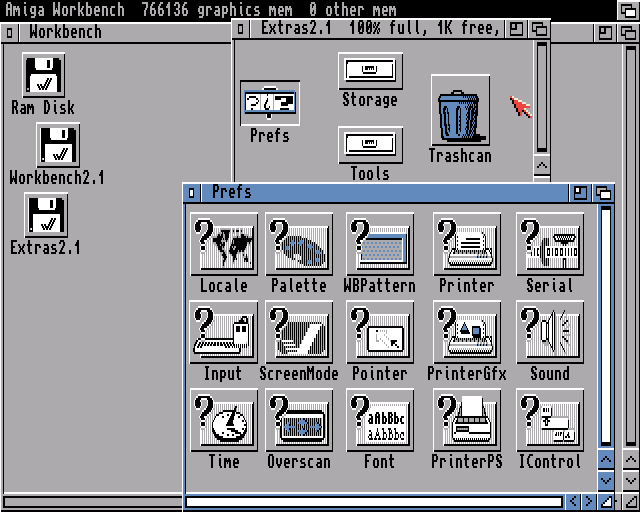
A stock A600 was sold with 1 MiB RAM. As indicated in the screenshot on the menubar at the top ("766136 graphics memory"), the default installation of the operating system claims less than 250 KiB of memory. Memory usage varied after configuring the system but that is a good approximation of its footprint. Think about it for a second and compare this with the monster machine that you are probably using to read this article.
§ The future that was here[1]
The Amiga platform has seen all kinds of hardware upgrades. Already in the early Nineties, hobbyists and professional third-parties supplied what the faltering pace of development from Commodore failed to deliver: from simple memory expansions to hardware that completely replaces the original chipset. Today, thanks to programmable hardware (FPGA and such) we can install powerhouses at the time not even conceivable, such as pluggable RaspberryPI boards like the PiStorm cards or the Vampire accelerator cards. Old magnetic hard disks are now replaced by Compact Flash or SD cards. Network devices appeared. And so on and so forth.
Observing this wave of new hardware is exciting, people are trying hard to imagine "what if" scenarios where the platform outlived itself and you can run software published long after it died, like conversions of videogames such as Dark Forces or Quake 2. This is all great fun but it is also a bit like flexing muscles, in my opinion.
§ Calm computing?
"Calm computing" or "calm technology"[2] is more or less defined as a way to interact with technology in an intuitive and non-invasive way (includes user interfaces in general or other consumer devices such as tea kettles, signage, etc.). In principle, this overlaps only partially with this article and I'll stretch a little bit this concept for the sake of reasoning.
So, computing with an Amiga is a less stressful experience both because less distracting and because "crystallized" in time.
I want to try exploring this "calm computing" experience. For example, while writing this article I am checking various notifications and opening tabs in the browser until I lose focus and have to go back to writing. That's not the kind of computing experience that it was in the Nineties.
Rediscovering an Amiga today means exploring it at its pace without benchmarks or frame-per-second anxiety. It's a platform meant for general computing, it's a personal computer (in the original sense of the "PC" acronym) so there's really a lot that one can accomplish. Some examples:
- Software development: modern (for the Nineties) GUI programming using the ReAction toolkit. Availability of IDEs. Choice of programming languages both low and high level (C, AmigaE, various BASIC variants or bare metal in Assembly). IPC communication through Messages and Ports). Inter-application communication through a scripting language called ARexx. There's even a rudimental version of Emacs (LOL).
- Want to provide an easy way for a user to install your software? You can build a GUI script using a lispy dialect with Installer.
- Write documentation or a manual for your software? AmigaGuide - a hypertext file format similar to
infoormanpages - gets you covered. - Multimedia applications using Scala400, a high end software package similar to (but more powerful than) MS PowerPoint.
- Tools to create music, like Protracker, graphics with Deluxe Paint or desktop publishing.
- And of course a vast videogames and edutainment library of software developed during the commercial lifespan of the platform, and by hobbyists after that.
On Wikipedia a better list than I can ever provide.
And all this software is offline (see my previous point): full documentation and manuals were provided by books or in digital form along with the software package. The kind of "sealed" computing experience a bit lost today.
§ Rose-tinted glasses
No.
I'm not going to drop blanket statements like "everything was better back in the day" and I won't make it look like an Amiga can do everything I can do today. Even pushed over its limits with modern peripherals, an Amiga probably offers today a subpar experience. In fairness, a few things are sorely missing compared to the modern computing experience I am used to:
- Lack of memory protection. MMUs at the time were only starting to appear in the consumer markets, therefore paging memory was a thing to come. Operating systems were at the mercy of applications not accessing areas of memory they didn't own and in case of error taking down everything.
- A CLI-first user interface. Spoiled by Linux, I find AmigaDOS honestly a bit rudimental.
- Lack of a seamless access to the wealth of information that is Internet. There is hardware (Ethernet and Wi-Fi adapters) and software (TCP/IP stacks, SSL and WWW browsers) to access Internet but the machine is underpowered and designed before our world went online, so the online experience is quite limited and hacky.
- A diffuse mentality lacking the learnings of the last 20 years of free/open-source movement: most software licensing is a bit stuck in the Nineties. An embarrassingly high toxicity in communities and companies where feuds and "turf wars" are not unusual. Pretty awkward for such a small space, I must say.
Some people enjoy their Amiga in a contemplative way, taking photos of it, running benchmarks after the latest upgrade, customizing the desktop, treating the machine a bit like driving a classic car on Sundays and then spending the rest of the day shining it with a cloth. That's totally fair and also very didactical entertainment. A teaching experience for me would be instead trying picking a task from my never ending TODO list and accomplish that on an Amiga. For example I could write this blog post, I could design and develop a simple GUI application, sketch a drawing or anything mentioned before.
The point of accomplishing something on that platform is to appreciate similarities and differences with today's experience. It's important to touch with hands that a lot of what we have today was already available at the time. I want to make the point that the future was here 35 years ago and in some cases we've been just reinventing the wheel over and over again for small increments in quality.
Conversely, modern technology also brought byproducts that we would happily live without. If you can mirror yourself even partially in the experience of the LD student of Timo, then ask yourself what went wrong and what could be done to provide a saner and safer computing experience.
§ Conclusions
If you find this topic interesting, I can recommend a few articles from WhatIFF?. The fanzine is published in AmigaGuide format (it's just ASCII text with some typesetting) so you'll want to use an Amiga or an emulator like WinUAE, FS-UAE or something online such as TAWS to view the magazine the way it's intended. Worst case you can just download and uncompress the LHA archive and use any text editor to view the .guide file.
- From WhatIFF 1.06: Little Things That Made Amiga Great by Carl Svensson
- From WhatIFF 2.09: Kickstarting Your Zen by Ivan Sorensen
- From WhatIFF 2.12: Amiga Through the Lens of an LD Learner by Timo Paul
- Decades of Fun: Computers Built to Last by Carl Svensson
If you fancy losing yourself down this rabbit hole, a quick search on Internet will easily find a lot of content glorifying and dissecting this computing platform and its software in every detail.
-
See here for more info ↩